Commercial Vehicle Tracking System Introduction: In the fast-paced world of commercial transportation, businesses are constantly seeking innovative solutions to optimise their fleet operations. One such technology that has gained significant traction is the commercial vehicle tracker. These advanced tracking systems offer a myriad of benefits, ranging from improved fleet management and operational efficiency to enhanced security measures.
Commercial vehicle trackers are becoming indispensable tools for businesses operating fleets of all sizes. As technology continues to evolve, these trackers will play a pivotal role in shaping the future of commercial transportation, offering unprecedented levels of efficiency, security, and data-driven decision-making capabilities for fleet managers. Embracing this technology is not just a competitive advantage; it’s a necessity for businesses aiming to thrive in the dynamic landscape of modern transportation. Click now to book a demo or get a quote for your fleet today.
What are Commercial Vehicles?
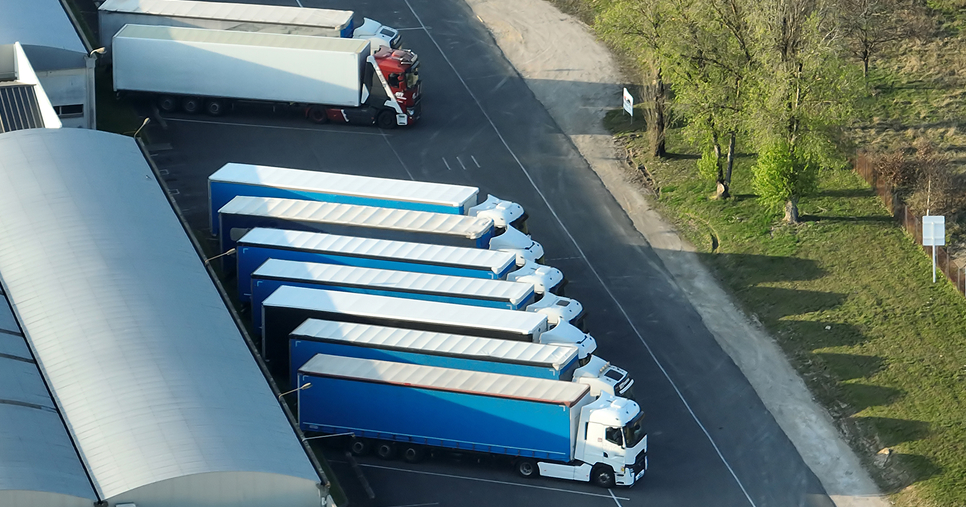
Commercial vehicles are automobiles primarily designed and used for transporting goods or passengers for business purposes. These vehicles play a crucial role in various industries, facilitating the movement of goods, services, and people. Unlike private or personal vehicles, commercial vehicles are intended for commercial or industrial use, often involving transportation, delivery, or passenger services.
Commercial vehicles are automobiles primarily designed and used for transporting goods or passengers for business purposes. These vehicles play a crucial role in various industries, facilitating the movement of goods, services, and people. Unlike private or personal vehicles, commercial vehicles are intended for commercial or industrial use, often involving transportation, delivery, or passenger services.
There are several types of commercial vehicles, each serving specific purposes based on the nature of the business. Here are some common categories:
1. Trucks: Trucks are versatile commercial vehicles designed to transport goods. They come in various sizes, from light-duty trucks used for local deliveries to heavy-duty trucks capable of long-distance hauling. Trucks often have cargo compartments, flatbeds, or specialised trailers to accommodate different types of freight.
2. Vans: Vans are used for transporting goods or passengers. They come in different sizes, including cargo vans for deliveries and passenger vans for group transportation. Vans are commonly used by businesses for local deliveries and shuttle services.
3. Buses: Buses: Buses are large vehicles designed to transport groups of people. They are commonly used for public transportation, school buses, and charter services. Buses can vary in size and capacity, accommodating a range of passengers from small to large groups.
4. Delivery Vehicles: Specifically designed for transporting goods for delivery, these vehicles are often smaller than trucks and are used for local distribution. They include vehicles like delivery vans, food trucks, and specialised vehicles for courier services.
5. Taxis and Ride-Sharing Vehicles: Vehicles used for transporting passengers on a hire basis fall into the commercial category. This includes traditional taxis as well as modern ride-sharing services like Uber and Lyft.
6. Construction Vehicles: Vehicles used in construction and industrial settings are also considered commercial vehicles. This category includes dump trucks, concrete mixers, bulldozers, and other heavy equipment used for construction and infrastructure development.
7. Trailers and Semitrailers: Trailers and semitrailers are non-motorized vehicles towed by trucks. They are designed to transport goods and materials efficiently. Specialised trailers exist for various purposes, such as refrigerated trailers for transporting perishable goods.
8. Specialised Vehicles: Some commercial vehicles are designed for specific purposes, such as ambulances for medical transportation, fire trucks for firefighting, and armored vehicles for secure transport of valuables.
What does a Commercial Vehicle Tracking System do?
TecHGV is your user-friendly electronic transport manager, TecHGV allows you to maintain your vehicle’s documents, vehicle management, vehicle reports, reminders, alerts regarding vehicle maintenance, vehicle tracker, vehicle maintenance planner, vehicle fuel & adblue usage, vehicle torque register, vehicle tyre/wheel reports and much more. Get a free quote now and get started.
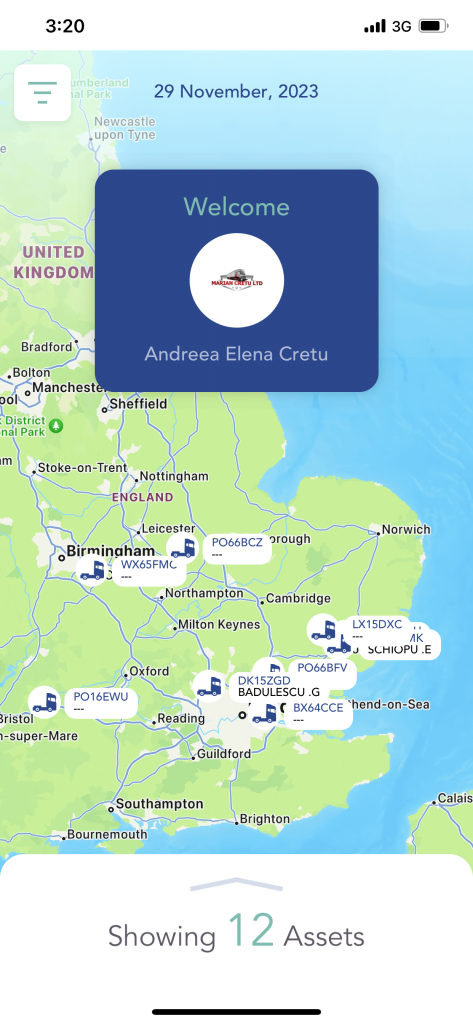
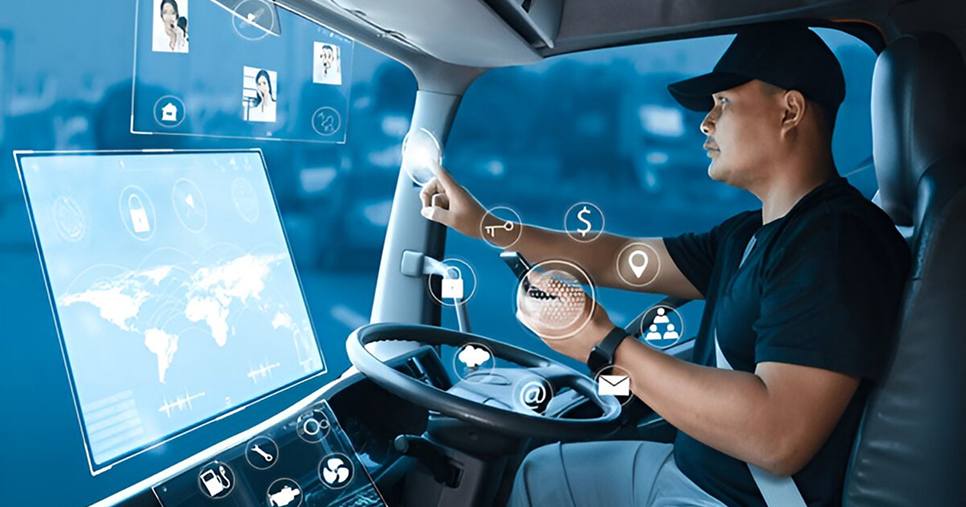
Commercial Vehicle Tracking system, also known as GPS trackers or telematics devices, are sophisticated technologies designed to monitor and track the location, movement, and various parameters of vehicles in real time. These devices utilise the Global Positioning System (GPS) and cellular or satellite communication to provide accurate and up-to-date information about a vehicle’s whereabouts and performance. Here’s a detailed explanation of what vehicle trackers do:
1. Real-Time Location Tracking: The primary function of vehicle trackers is to provide real-time information about the location of a vehicle. By using GPS technology, these trackers pinpoint the exact geographical coordinates of a vehicle at any given moment. This information is transmitted to a central server, allowing authorised users to access it through web-based applications or software.
2. Route Monitoring and Optimisation: Vehicle trackers enable businesses to monitor the routes taken by their vehicles. This information helps optimise travel routes for efficiency, reduce fuel consumption, and improve overall fleet management. It allows companies to identify the most cost-effective and time-efficient paths for their vehicles.
3. Speed Monitoring: Many vehicle trackers can monitor the speed of a vehicle in real-time. This feature is valuable for businesses looking to promote safe driving practices among their drivers, comply with speed regulations, and reduce the risk of accidents. Managers can receive alerts when a vehicle exceeds predetermined speed limits.
4. Geofencing:Geofencing is a feature that allows users to define virtual boundaries or geographical areas on a map. When a vehicle equipped with a tracker enters or exits these predefined zones, the system can generate alerts. Geofencing is widely used for monitoring vehicle entry and exit at specific locations, enhancing security, and ensuring compliance with designated routes.
5. Telematics Integration:Vehicle trackers often integrate with telematics systems to provide comprehensive insights into the health and performance of the vehicle. This includes data on engine diagnostics, fuel consumption, and overall vehicle condition. Telematics data is crucial for predictive maintenance, helping businesses address potential issues before they lead to breakdowns.
6. Fuel Monitoring: Vehicle trackers can monitor fuel consumption patterns, helping businesses identify inefficiencies and wasteful practices. By analysing data on fuel usage, companies can implement strategies to improve fuel efficiency, reduce costs, and minimise environmental impact.
7. Driver Behaviour Monitoring:Many advanced vehicle trackers include features to monitor driver behaviour, such as harsh acceleration, braking, and cornering. This data helps businesses assess and improve driver safety, leading to reduced accident rates, lower insurance premiums, and increased overall road safety.
8. Stolen Vehicle Recovery:In the unfortunate event of vehicle theft, vehicle trackers can assist in recovering the stolen asset. Real-time location information provided by the tracker helps law enforcement authorities track and retrieve the stolen vehicle quickly.
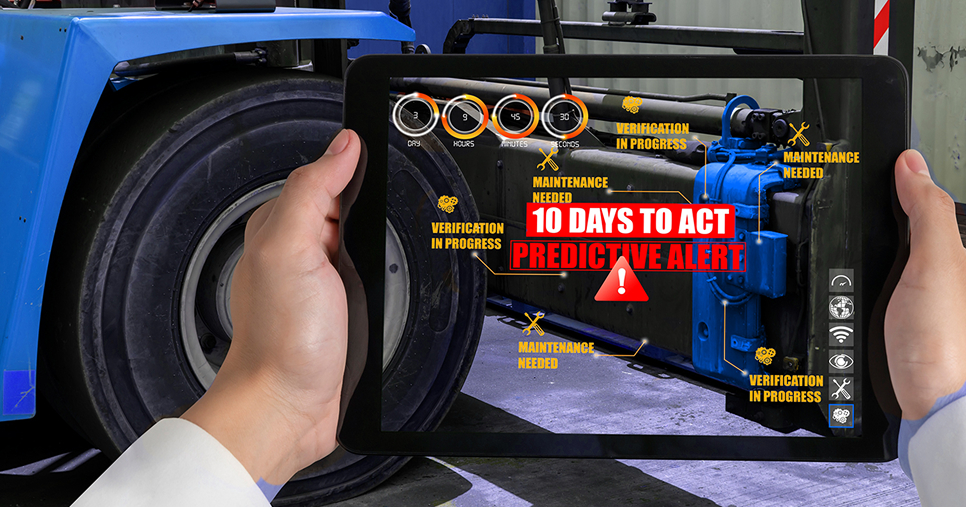
9. Maintenance Alerts: Vehicle trackers can generate alerts based on predefined maintenance schedules or when certain parameters indicate potential issues. This feature aids in proactive maintenance, reducing vehicle downtime and preventing major repairs.
10. Data Reporting and Analytics:Vehicle trackers collect a wealth of data, and many systems provide reporting and analytics tools. Businesses can analyse historical data to identify trends, evaluate the performance of their fleet, and make data-driven decisions to enhance overall operational efficiency.
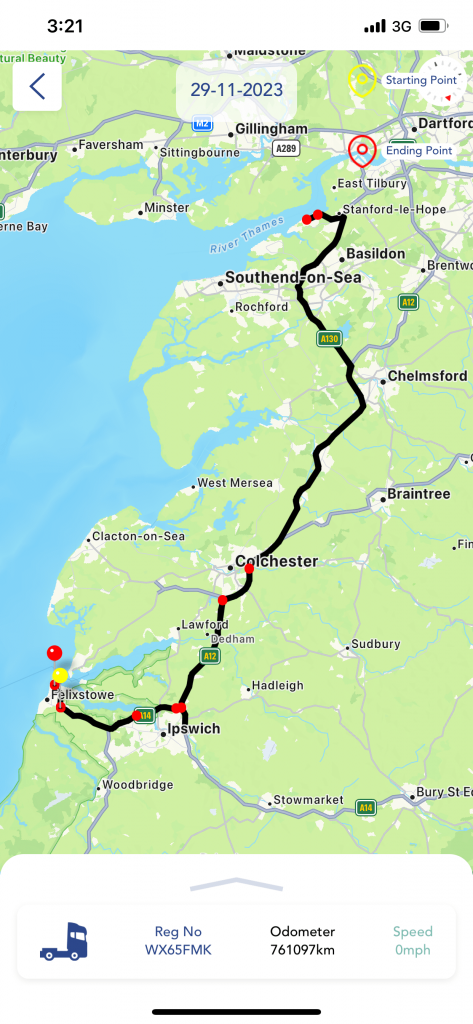
Now lets explore TecHGV Commercial Vehicle Tracking System feautures in detail. TecHGV offers complete vehicle management and vehicle tracking solutions, here are some of the major features:
- Vehicle management system
- Vehicle tracking system
- Vehicle document centre
- Vehicle calendars and alerts
- Vehicle ISO maintenance planner
- Vehicle documents and reports linked with TecHGV’s T-Drive
- Fuel and Adblue usage
- Vehicle tyre/wheel report
- Vehicle torque register report
- Vehicle Gap Analysis
- Vehicle daily checks/walkaround checks
- Tachograph Analysis
- Remote Tacho download
- Tacho schedule
Commercial Vehicle Tracking System: Vehicle Management System
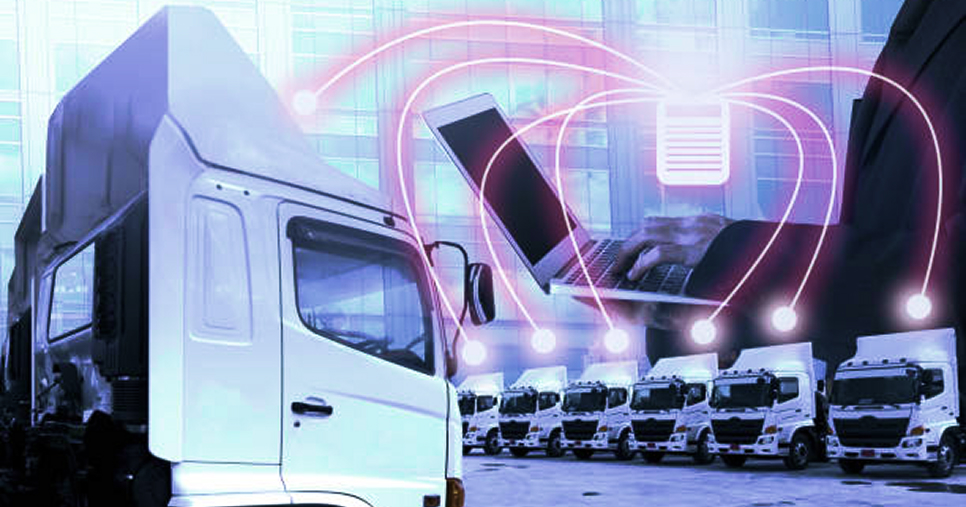
Managing a fleet of vehicles can be very challenging, at least, from a cost control perspective. After all, vehicles are indeed an expensive asset for fleet companies; mainly, due to heavy fuel and maintenance expenses. To make matters worse, fleet managers often lack visibility into daily fleet operations, as well. This means that they cannot deal with arising problems in time. To that end, TecHGV Vehicle Management System can help managers to streamline a series of complex daily operational tasks; and, in the long run, build a wholesome strategy to boost their business bottom line.
TecHGV’s Vehicle Management System (T-VMS) is a comprehensive solution designed to streamline and optimise the management of a fleet of vehicles. It incorporates various technologies and tools to provide real-time insights, improve operational efficiency, enhance safety, and reduce overall costs. TecHGV’s Vehicle Management System for fleets of any size and mix. By being intuitive with a highly flexible user interface, TecHGV’s Vehicle Management System consistently fits the requirements of anyone responsible for the management of the fleet.
Here’s a detailed exploration of the components and functionalities of TecHGV’s Vehicle Management System:
- Real-Time Vehicle Tracking: A core feature of VMS is real-time vehicle tracking. Using GPS technology, VMS allows fleet managers to monitor the location and movement of each vehicle in the fleet. This information is usually accessible through a centralised dashboard, providing a live map view of all vehicles.
- Driver Behaviour Monitoring: TecHGV’s Vehicle Management System includes tools for monitoring driver behaviour, including speed, harsh braking, acceleration, and adherence to traffic rules. This data helps businesses promote safe driving practices, reduce the risk of accidents, and identify opportunities for driver training.
- Fuel Management: Efficient fuel management is critical for cost savings. TecHGV’s Vehicle Management System provides insights into fuel consumption patterns, identifies fuel-wasting behaviours, and offers recommendations for improving fuel efficiency. This feature contributes to significant cost reductions over time.
- Maintenance Planning: TecHGV’s Vehicle Management System monitors vehicle health and usage, providing data on mileage, engine diagnostics, and upcoming maintenance needs. By analysing this information, fleet managers can schedule preventive maintenance, reducing unexpected breakdowns and prolonging the lifespan of their vehicles.
- Driver and Vehicle Documentation: TecHGV’s Vehicle Management System centralises documentation related to drivers and vehicles. This may include licence information, vehicle registration details, insurance documentation, and more. Having all necessary paperwork in one place facilitates compliance and regulatory requirements.
- Safety and Compliance: TecHGV’s Vehicle Management System helps ensure compliance with safety regulations and industry standards. It includes features for monitoring driver working hours, adherence to rest periods, and compliance with other legal requirements. This reduces the risk of regulatory penalties and improves overall safety.
- Reports and Analytics: TecHGV’s Vehicle Management System generates comprehensive reports and analytics based on the data collected. Fleet managers can analyse trends, identify areas for improvement, and make informed decisions to enhance overall fleet performance.
- Security and Anti-Theft Measures: VMS includes security features to protect against theft. In the event of a stolen vehicle, the real-time tracking capabilities aid in quick recovery.
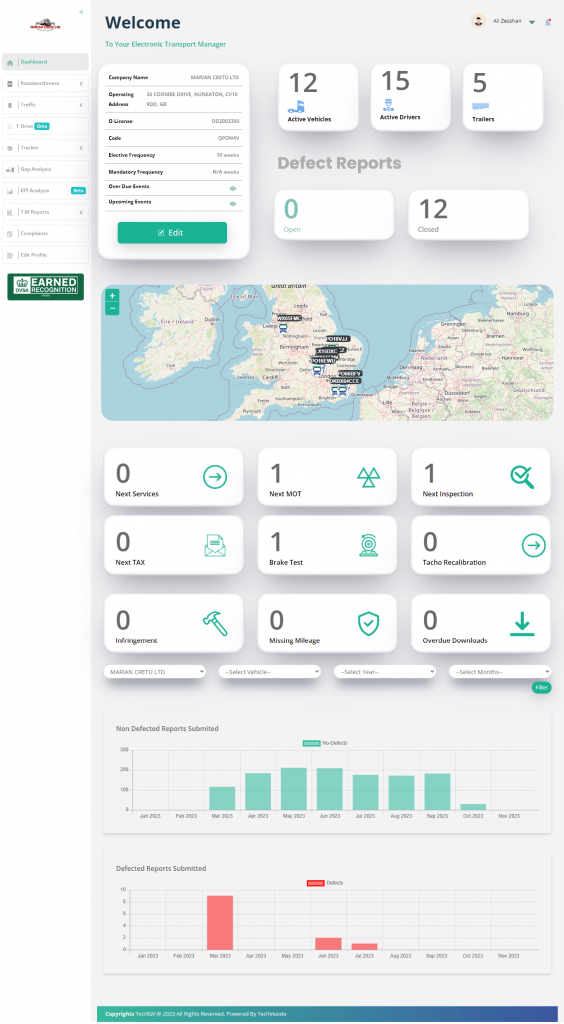
Commercial Vehicle Tracking System: Vehicle Map Tracker Ploting
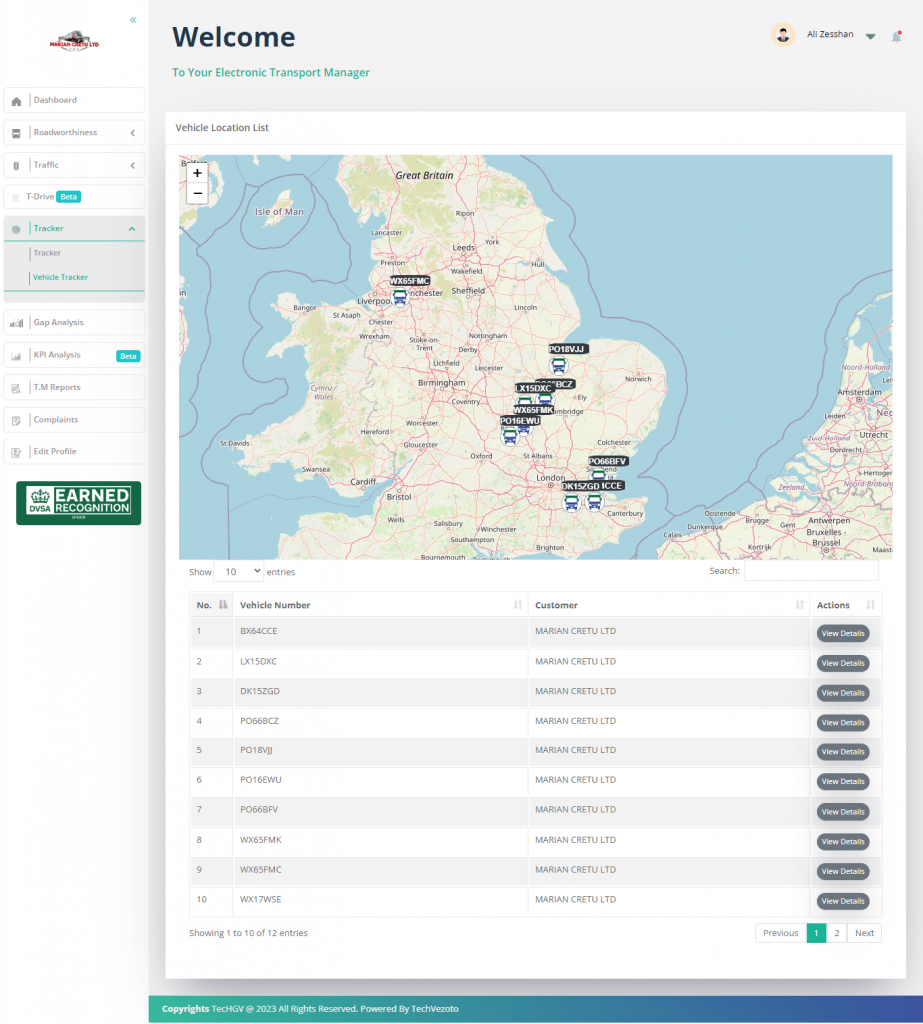
TecHGV Commercial Vehicle Tracking System has many features that help fleet managers control their fleet and have better insights. Some of the features are mentioned below:
Find the Vehicle’s current location
Now you can find your vehicle’s current, recent, or last location on a map by using a web dashboard or mobile application. It is very user-friendly to use, just click on the icon on the map and it will take you to the vehicle’s last/current location on the map after 1-2 minutes map refreshes itself so you can get the realtime location via the moving icon on the map.
Vehicle Trip History
Each entry in the trip history includes the date and time when the trip started and ended. This chronological information helps in understanding the timing and duration of each journey. The trip history records the starting and ending locations of each journey. This information is often presented with precise geographical coordinates or an address, providing insights into the specific routes taken by the vehicle.
The total distance covered during the trip is a crucial metric included in the trip history. This helps in assessing the efficiency of routes, fuel consumption, and overall travel patterns. The time taken for each trip is recorded, offering insights into the efficiency and speed of travel. This information is valuable for optimising routes and schedules.
Vehicle Map Plotting Tracking
TecHGV Vehicle Map Plotting Tracking refers to the process of visually representing the movement and location of vehicles in real time on a map. It also shows the total moving hours, total not moving hours, and total hours for the specific selected date.
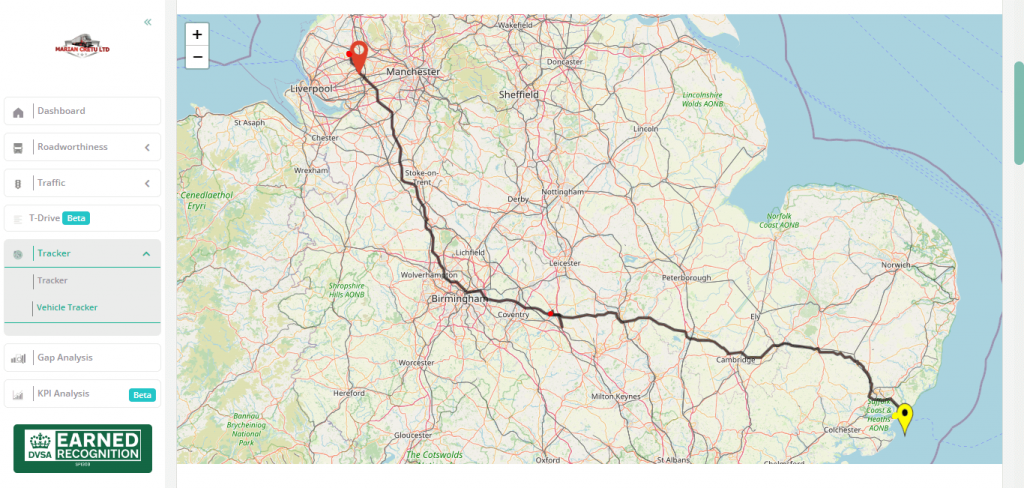
This tracking method utilises advanced technologies such as Global Positioning System (GPS) and Geographic Information System (GIS) to continuously monitor the position of vehicles and display this information on a digital map interface. The primary goal is to provide a dynamic and visual representation of vehicle locations, allowing users to track and manage their fleet effectively.
TecHGV Vehicle Map Plotting Tracking often includes the ability to trace and display the historical routes taken by vehicles. This feature allows users to analyse past movements, identify patterns, and optimise future routes.
Vehicle Map Location Plotting Date Filter
The Date Filter is a user-friendly tool that allows users to select a specific date or a range of dates for which they want to view the historical location data of vehicles. This filter is essential for narrowing down the displayed information to a specific timeframe.
The TecHGV system utilises a digital map interface where vehicle locations are plotted in real-time. This interface is based on the popular mapping service OpenStreetMap. Each vehicle in the fleet is represented on the map by an icon or marker. The icons may carry additional information such as the vehicle’s identifier, status, or other relevant details.
Tacho Mode
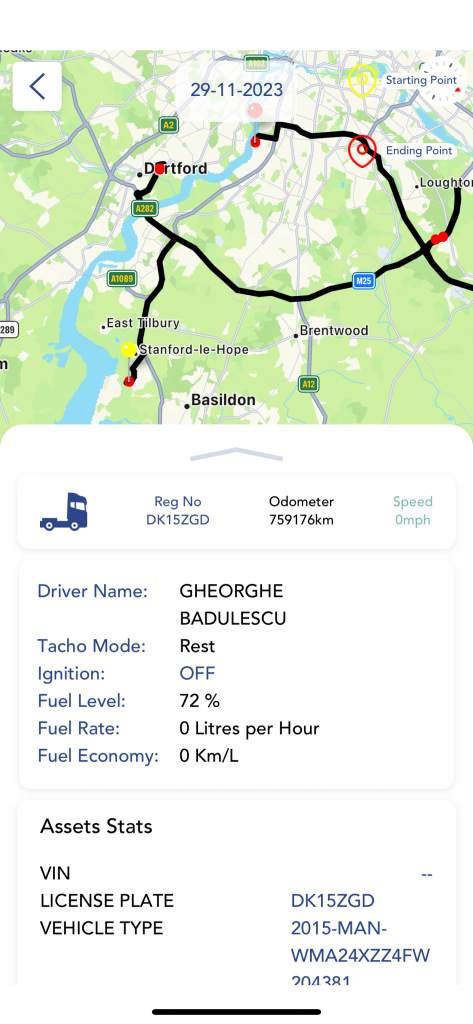
TecHGV commercial vehicle tracking system gives information regarding driver mode as well. TecHGV commercial vehicle tracking system shows these three Tacho Modes: Working, Rest and Not Moving. By these Tacho Modes we can determine the state of the vehicle for example rest mode means: the vehicle is unloading.
Commercial Vehicle Tracking System: Vehicle Document Centre
TecHGV vehicle document centre for managing vehicle-related documentation typically includes a range of features designed to streamline administrative processes, ensure compliance, and facilitate efficient document management. TecHGV vehicle document centre manages all the PMI, BT, MOT, Taxes, Insurance, Tacho 2 year, Services, insurance, and DVS documents/PDF reports in one place.
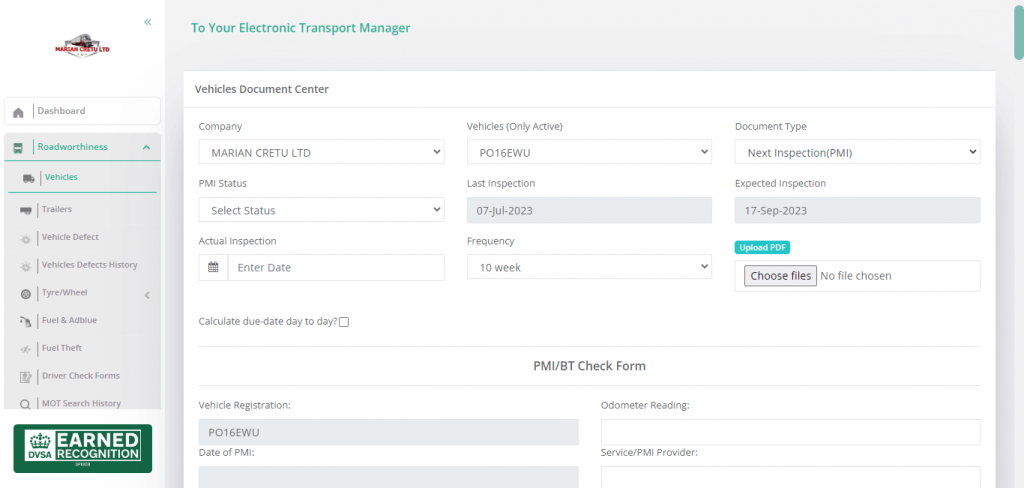
Access to the TecHGV Vehicle Document Centre is controlled through user roles and permissions. This feature ensures that only authorised personnel can access, modify, or add documents, maintaining security and confidentiality. Documents are stored in a digital format, allowing for easy retrieval, sharing, and management. This digital approach minimises the reliance on physical paperwork and reduces the risk of document loss or damage.
Customers and signatories get alerts and reminders for important events related to documents and overdue events as well. For example, the system can generate reminders for overdue events, insurance policy renewals, vehicle inspections, or other time-sensitive tasks.
The TecHGV vehicle document centre is linked with T-Drive (TecHGV Cloud Storage Space for customers & signatories for professional and personal use). T-Drive is Google Drive’s alternative cloud-based storage space. T-drive is linked with every customer’s vehicle, at the time of creating a vehicle, standard folders are created automatically. Now customers don’t have to create every folder in Google Drive for every vehicle.
Commercial Vehicle Tracking System: Calendar and Alerts
A Vehicle Calendar is a digital tool designed to manage and organise schedules, events, and important dates related to vehicles. This calendar system is particularly valuable for fleet managers, maintenance teams, and individuals responsible for coordinating activities involving a group of vehicles.
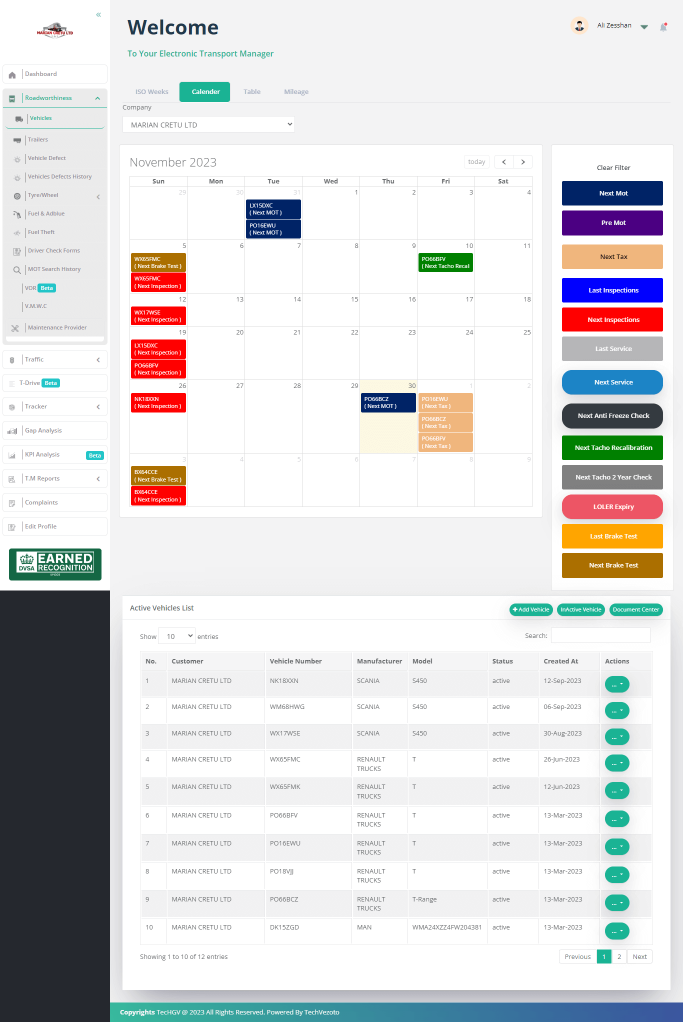
A Vehicle Calendar and Alerts system offers a set of unique and basic features to help manage schedules and appointments and receive timely notifications related to vehicles. In the TecHGV web dashboard customers & signatories have different types of calendar views such as simple calendar view, ISO week maintenance planner view, table view, and mileage calendar view.
The calendar system is integrated with vehicle management systems to pull relevant data, such as PMI, MOT, BT dates, etc. This integration helps in scheduling maintenance based on actual usage. This calendar is linked with the vehicle document centre. Vehicle Calendar serves as a centralised digital platform for planning, scheduling, and managing various events and tasks related to a fleet of vehicles.
TecHGV vehicle calendar view has a simple calendar view along with an events filter. Dates are filled with vehicle registration numbers along with the event name, Every event has a unique colour, so it’s easy to recognise events with colour.
An ISO (International Organisation for Standardisation) compliant Vehicle Maintenance Planner is a structured and systematic approach to planning, scheduling, and executing maintenance activities for vehicles, ensuring adherence to ISO standards related to quality and efficiency.
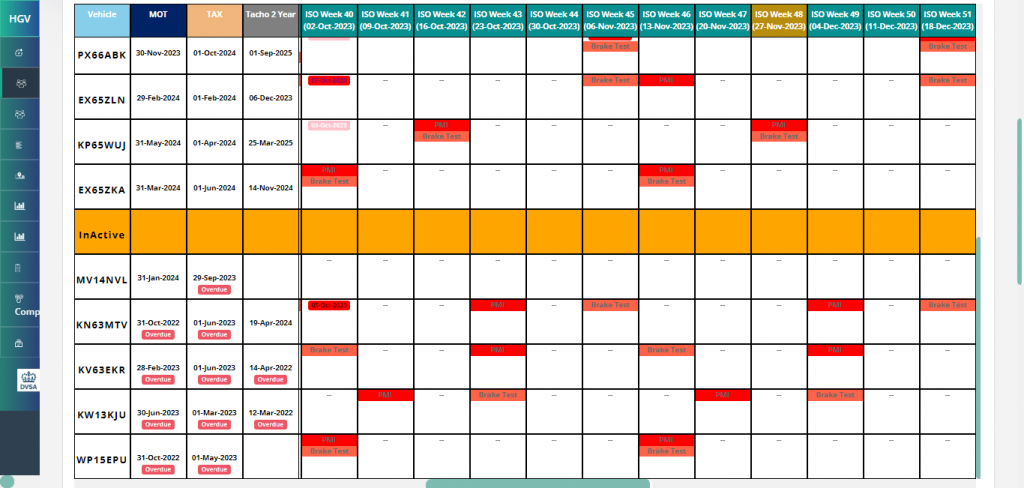
TecHGV offers an ISO week vehicle maintenance planner, which gives a spreadsheet look and feel. Time to say goodbye to Google SpreadSheet for vehicle maintenance planners because the TecHGV ISO week vehicle maintenance planner is very user-friendly and has a lot of features, here are some of them:
- PMI & BT future dates are plotted in the ISO week planner according to their frequencies
- You can see 6 months of data before and after the current week
- Events filters along with year filter as well
- Upload documents from the ISO week planner, ISO week planner is integrated with the document centre and T-Drive
- If the vehicle was VOR, the cells will be highlighted in the planner with black badges saying “VOR” in the cells
- Click anywhere in the ISO week planner to upload the missing PMIs/BTs (They will be plotted in the cells after upload but currently by clicking on any event, you can only see the latest document)
- The TecHGV system will calculate the missing PMIs/BTs and they will be displayed in the cells where the system thinks a vehicle has some missed PMI/BT
- The TecHGV system will calculate the missing PMIs/BTs and they will be displayed in the cells where the system thinks a vehicle has some missed PMI/BT
- Overdue badges appear on overdue events
- Scrollable cells, now you can have multiple events in a single cell
Request a demo today and learn more about the TecHGV ISO week vehicle maintenance planner.
TecHGV provides permission-based alerts such as moving vehicles without checks, moving vehicles with overdue Tax, MOT, PMI, moving vehicles with open defects, and VOR vehicles moving, etc. Automatic alerts and reminders are generated for upcoming events, and overdue events.

Upcoming and Overdue Events Alerts and Reminders is a comprehensive system designed to keep users informed about scheduled tasks, maintenance, and other important events related to vehicles in a fleet. This feature-rich feature ensures that users receive timely alerts about upcoming events and reminders for tasks that are overdue.
The system provides advance notifications for upcoming events, such as scheduled maintenance, inspections, registrations, or other tasks. Users receive alerts well in advance to ensure proper preparation. Users receive alerts and reminders for events that are overdue. This includes maintenance activities that were not completed on time, inspections that were missed, or any other events that have exceeded their scheduled deadlines. Different types of alerts and reminders are often colour-coded for easy visual recognition. This helps users quickly identify the nature and urgency of each notification.
Commercial Vehicle Tracking System: T-Drive
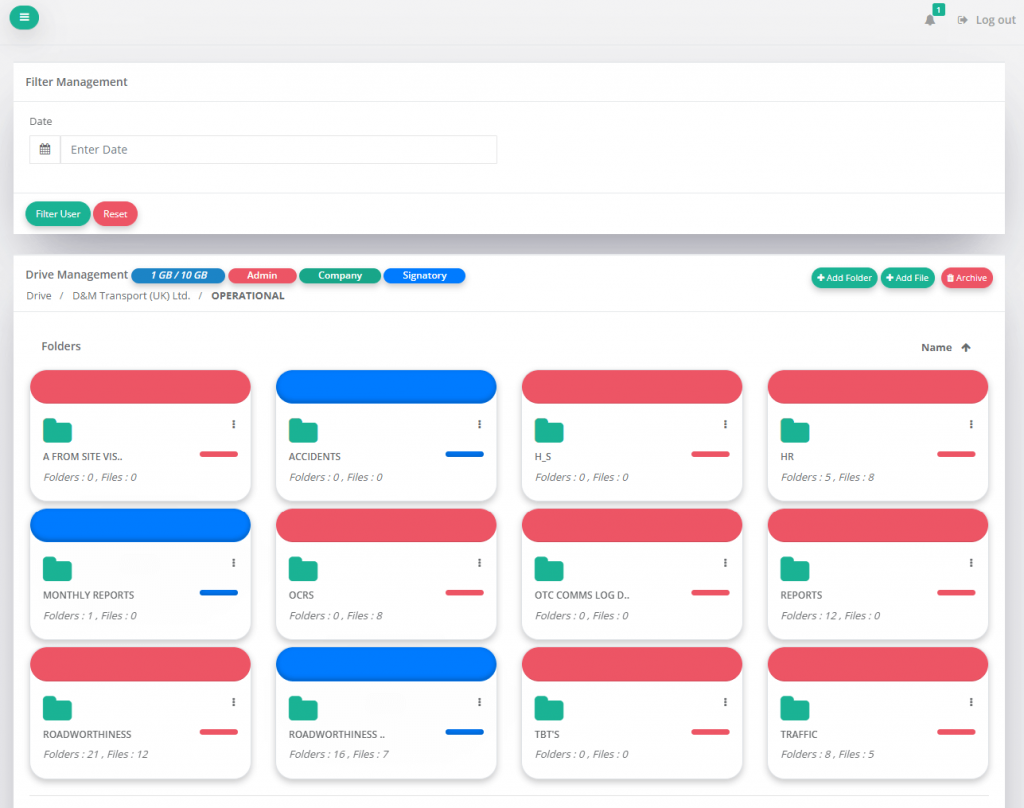
TecHGVs T-Drive is a company’s personal/private storage space assigned by TecHGV for their documents, images, videos, etc. T-Drive is a cloud-based file storage and synchronisation service developed by TecHGV. It offers a range of features and benefits that make it a popular choice for fleet operators, businesses, and individuals.
T-Drive service is available on the web app & mobile application for the customer dashboard, signatory, and driver. Here are some of the key features and benefits of T-Drive:
Automation
While using T-Drive for your fleet management, you don’t have to create every folder for every vehicle. While creating a vehicle from the mobile app or web app, the standard folder structure is created against every vehicle and each vehicle has multiple subfolders. Users can also create their own folders and make their folders private or public.
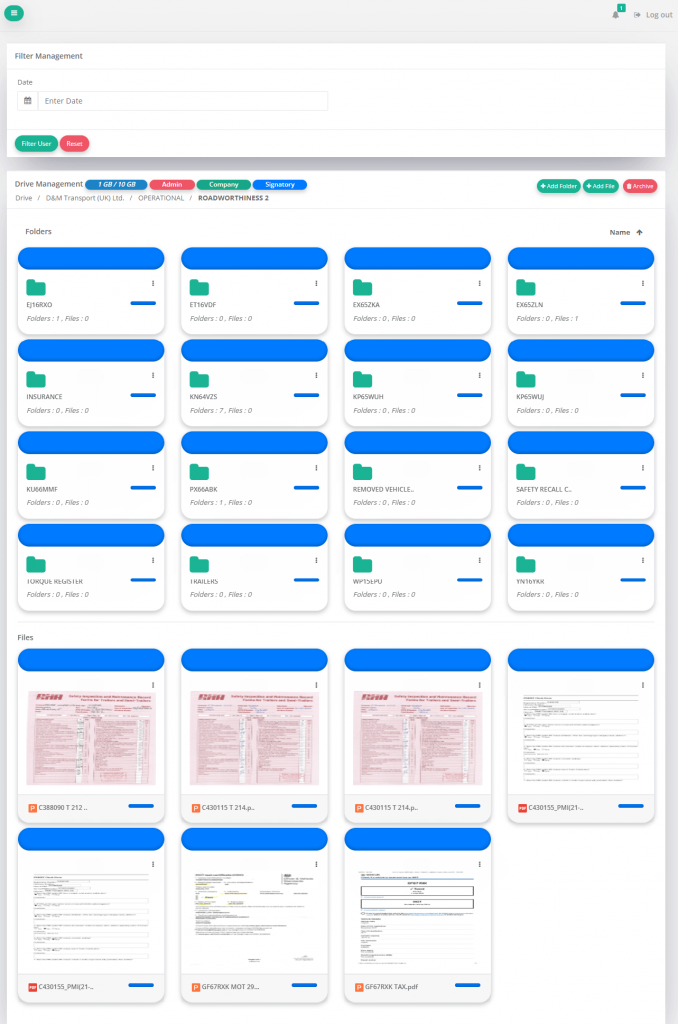
All vehicle-related reports are automatically transferred/placed in T-Drive so users don’t have to upload reports themselves. This automation reduces a lot of work time and it is accessible from the web and mobile application.
File Storage
T-Drive provides users with cloud storage space to store documents, photos, videos, and other files. All formats are acceptable png, mp3, mp4, pdf, doc file, zip, and even .ddd file. During the archive or delete file or folder, there is an option to shift data of the deleted folder to another folder, so by this method, the user’s data is saved.
File Sharing
Users can easily share files and folders with others. By sharing option reports important documents can be shared between organisations.
Access Control
TecHGV T-Drive offers robust access control features, allowing users to control who can view, edit, or comment on their files. This ensures data security and privacy.
Search Feature
TecHGV T-Drive includes powerful search functionality, making it easy to find files based on keywords, file types, date range filters or other criteria. Files can be organised into folders, and labels can be added for additional categorisation. User can add their custom label and even colours to their folders for better understanding.
File Preview
Users can preview various file types directly within TecHGV T-Drive without the need to download them. This includes the ability to preview images, videos, and document formats.
Mobile Accessibility
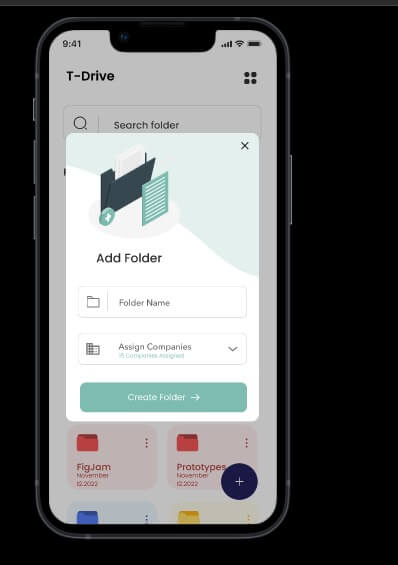
TcHGV T-Drive is accessible also via a mobile app for iOS and Android devices. Users can view, download, and upload reports/files/documents on the go.
Commercial Vehicle Tracking System: Fuel & Adblue Usage
Commercial vehicle tracking systems play a crucial role in monitoring and managing the operations of fleets. Monitoring fuel consumption and AdBlue usage is a key aspect of these systems, contributing to efficient fleet management and cost control.
In the dynamic landscape of the automotive industry, the twin considerations of fuel and AdBlue usage have taken centre stage. Fuel, the lifeblood of internal combustion engines, and Adblue, the eco-friendly additive, play pivotal roles in defining the efficiency and environmental impact of vehicles. Let’s delve into the intricacies of these elements and explore ways to navigate the road to optimal usage.
For more information and daily updates follow us on Instagram.
Understanding Fuel
Fuel is the driving force behind the roaring engines that power our vehicles. It comes in various forms, including gasoline and diesel, each with its unique combustion characteristics. The combustion process within the engine releases energy, propelling the vehicle forward. As consumers, understanding the nuances of different fuels empowers us to make informed choices about our vehicles’ performance.
Adblue: The Eco-Friendly Solution
Adblue, a colorless liquid comprising urea and deionized water, is a revolutionary solution in the quest for cleaner emissions. When injected into the exhaust stream of diesel vehicles, Adblue undergoes a chemical reaction through selective catalytic reduction (SCR), effectively reducing harmful nitrogen oxide (NOx) emissions. Its environmental benefits make Adblue a key player in the drive towards sustainable transportation.
Fuel Usage Tracking
- Real-time Monitoring:: TecHGV Commercial vehicle tracking systems provide real-time data on fuel consumption. This information helps fleet managers identify irregularities and take timely actions to optimise fuel efficiency.
- Fuel Efficiency Reports: The TecHGV commercial vehicle tracking system generates reports that outline fuel usage patterns over specific periods. Fleet managers can analyse this data to identify trends, make informed decisions, and implement strategies to reduce fuel consumption.
- Idling Alerts: Monitoring idling time helps in reducing unnecessary fuel consumption. Fleet managers can set up alerts to be notified when vehicles idle for extended periods, allowing them to address the issue promptly.
AdBlue Usage Tracking
- Real-time Monitoring: Similar to fuel tracking, tracking AdBlue consumption in real-time ensures that vehicles comply with emission standards. This is particularly important for diesel engines equipped with selective catalytic reduction (SCR) systems.
- Maintenance Alerts: TecHGV commercial vehicle tracking systems send alerts when AdBlue levels are low, enabling timely refilling and preventing vehicles from operating without meeting emission standards.
- Integration with Maintenance Scheduling: Integrating AdBlue usage data with maintenance schedules allows fleet managers to plan AdBlue refills during routine maintenance, minimising downtime and ensuring compliance.
Integration with GPS Data
- Route Optimisation: By combining fuel and AdBlue usage data with GPS information, fleet managers can optimise routes to reduce overall fuel consumption. This includes avoiding traffic congestion, selecting shorter routes, and minimising unnecessary detours.
- Geo-Fencing for Efficiency: Implementing geo-fencing allows fleet managers to monitor vehicles within specific geographic boundaries. This helps in controlling fuel consumption and AdBlue usage in designated areas.
Data Analytics for Decision-Making
- Predictive Analytics: TechGV commercial vehicle tracking system’s advanced analytics can predict future fuel and AdBlue consumption based on historical data, enabling proactive measures to optimise usage and reduce costs.
- Cost Analysis: Fleet managers can conduct cost analysis based on fuel and AdBlue consumption data. This information assists in budgeting, cost forecasting, and identifying areas for improvement.
- Tyre Pressure Monitoring:
- Real-time Pressure Data: The tracking system continuously monitors and reports real-time tyre pressure data for each vehicle in the fleet.
- Alerts for Pressure Deviations: Automatic alerts are generated when the tyre pressure deviates from the optimal range. This helps in preventing issues related to under-inflated or over-inflated tyres, which can impact fuel efficiency and safety.
- Tyre Health and Wear Analysis:
- Tread Depth Monitoring: The system tracks the tread depth of each tyre, providing insights into tyre health and wear patterns.
- Predictive Maintenance: By analysing tread wear data, the tracking system can predict when tyres are likely to require maintenance or replacement. This enables proactive maintenance planning, reducing unexpected breakdowns and improving overall fleet reliability.
- Wheel Alignment Status:
- Alignment Monitoring: The tracking system monitors wheel alignment to ensure that the wheels are properly aligned. Misaligned wheels can cause uneven tyre wear and negatively impact fuel efficiency.
- Alerts for Alignment Issues: Automatic alerts are generated when the system detects alignment problems, prompting fleet managers to address these issues promptly.
- Temperature Monitoring:
- Heat Detection: The tracking system monitors tyre temperatures, helping to identify overheating issues that may indicate problems with brakes or other mechanical components.
- Temperature Alerts: Alerts are triggered when tyre temperatures exceed safe levels, allowing for timely intervention to prevent potential tyre failures.
- Historical Data and Reporting:
- Historical Performance Reports: Fleet managers can access historical data and reports on tyre and wheel performance. This information aids in trend analysis, allowing for continuous improvement in maintenance practices.
- Cost Analysis: The system provides insights into the costs associated with tyre maintenance, replacements, and repairs. This information assists in budgeting and cost control measures.
- Integration with Maintenance Scheduling:
- Scheduled Maintenance Alerts: The tracking system integrates with maintenance schedules, generating alerts when it’s time for routine tyre maintenance, rotations, or replacements. This ensures that maintenance tasks are conducted on time.
- Geographic Data and Route Analysis:
- Terrain and Route Impact: The system analyses geographic data and routes to assess the impact of different terrains on tyre wear. This information helps in optimising routes to minimise tyre stress and improve longevity.
- Real-time Torque Monitoring:
- Continuous Data Capture: The tracking system continuously monitors and records real-time torque data for each vehicle in the fleet.
- Instant Alerts: Automatic alerts are generated if there are deviations from the expected torque levels. These alerts help identify potential issues with the engine or drivetrain that may impact vehicle performance.
- Torque Distribution Analysis:
- Wheel-specific Torque: The report may provide insights into the torque distribution among individual wheels or axles. This information is particularly valuable for vehicles with multiple axles or all-wheel-drive systems.
- Dynamic Torque Changes: Analysis of torque changes during acceleration, deceleration, and various driving conditions helps in assessing the dynamic performance of the vehicle.
- Fuel Efficiency and Performance Metrics:
- Correlation with Fuel Consumption: The torque register report may correlate torque data with fuel consumption, helping fleet managers understand the relationship between engine performance and fuel efficiency.
- Performance Metrics:Tracking system data can be used to derive performance metrics related to torque, such as torque-to-weight ratios or power-to-weight ratios, aiding in performance evaluations.
- Historical Torque Data and Trends:
- Historical Performance Reports: Fleet managers can access historical torque data and reports to identify trends and patterns in the performance of individual vehicles or the entire fleet.
- Predictive Maintenance: Analysis of historical torque data can contribute to predictive maintenance strategies by identifying potential issues before they lead to major failures.
- Integration with Engine Diagnostics:
- Diagnostic Trouble Code (DTC) Alerts: Integration with the vehicle’s engine diagnostics system allows for the tracking of torque-related diagnostic trouble codes. Alerts are generated when the system detects issues that may affect torque performance.
- Maintenance Recommendations: The system may provide maintenance recommendations based on torque-related data, ensuring timely interventions to address any underlying problems.
- Customisable Reporting and Analysis:
- Custom Reports:Fleet managers can generate reports based on specific torque-related parameters of interest, tailoring the analysis to meet the unique needs of the fleet.
- Lights:
- Verify that all external lights (headlights, brake lights, indicators) are functional.
- Fluid Levels:
- Check engine oil, coolant, brake fluid, and other essential fluids to ensure they are at the recommended levels.
- Tyre Inspection:
- Check tyre pressure and adjust if necessary.
- Inspect tyre tread depth for legal compliance and even wear.
- Examine tyres for signs of damage or irregular wear.
- Brake System:
- Inspect brake pads and discs for wear.
- Check for any visible signs of brake fluid leaks.
- Steering and Suspension:
- Verify power steering fluid levels.
- Inspect suspension components for damage or wear.
- Windscreen and Wipers:
- Examine the windscreen for cracks or damage.
- Check the condition of the wiper blades.
- Mirrors:
- Ensure that external mirrors are clean and properly adjusted.
-
- Check the battery to ensure it is securely in place.
- Test the horn.
- Inspect electrical connections for any visible issues.
- Load and Cargo:
- Ensure that any cargo or load is securely fastened and within legal limits.
- Documentation:
- Confirm the presence of necessary documents such as the driver’s licence, insurance, and registration.
- Emergency Equipment:
- Check the availability and condition of emergency equipment, including the first aid kit and fire extinguisher.
- Why are Vehicle Daily Checks Important?
- Answer: Daily checks are crucial for identifying and addressing potential safety and maintenance issues before they escalate. They help prevent accidents, and breakdowns, and ensure compliance with legal and regulatory standards.
- What Does a Typical Walkaround Check to Include?
- Answer: A typical walkaround check includes inspecting lights, fluids (oil, coolant, brake fluid), tyres (pressure and condition), brakes, steering, suspension, windscreen, mirrors, and other critical components.
- How Often Should Daily Checks be Conducted?
- Answer: Daily checks should be performed before each journey. Even if the vehicle is used multiple times in a day, a pre-trip inspection is necessary for every trip.
- Do Walkaround Checks Differ for Different Types of Vehicles?
- Answer: Yes, the specifics of daily checks may vary based on the type of vehicle. For example, a checklist for a truck might include additional items compared to a checklist for a passenger car.
- What Happens If a Driver Identifies an Issue During the Check?
- Answer: If a driver identifies an issue during the check, they should report it to the fleet management or maintenance team immediately. The vehicle may need to undergo repairs or maintenance before it is deemed roadworthy.
- Are Daily Checks a Legal Requirement?
- Answer: In many jurisdictions, daily checks are a legal requirement for commercial vehicles. Compliance ensures the safety of the driver, passengers, and other road users.
- Is There a Standard Checklist for Walkaround Checks?
- Answer: While specific checklists may vary, there are general standards and guidelines provided by regulatory bodies. Companies often develop their checklists based on these standards and the unique characteristics of their fleet.
- Who is Responsible for Ensuring Daily Checks are Conducted?
- Answer: The primary responsibility lies with the driver. Fleet managers may provide guidance, training, and oversight to ensure that daily checks are consistently and effectively performed.
- Can Technology Assist in Conducting Daily Checks?
- Answer: Yes, technology such as mobile apps or telematics systems can streamline the process. These tools may include digital checklists, automated reminders, and real-time reporting.
- What Penalties Exist for Non-Compliance with Daily Checks?
- Answer: Penalties for non-compliance can include fines, regulatory sanctions, and, in the event of an accident due to negligence, legal liabilities.
- Driving Hours Compliance:
- Tachographs record the time a driver spends driving. Analysis ensures compliance with legal limits on daily and weekly driving hours, helping prevent fatigue-related accidents.
- Rest and Break Periods:
- Tachographs also record rest and break periods. Analysis ensures drivers take the required breaks and rest periods, contributing to driver well-being and safety.
- Speed Monitoring:
- Tachographs record vehicle speed. Analysis helps monitor and enforce speed limits, promoting road safety and reducing the risk of accidents.
- Distance Travelled:
- The distance travelled by the vehicle is recorded by the tachograph. Analysis ensures accurate reporting of distances covered during specific periods.
- Identification of Irregularities:
- Tachograph data analysis helps identify irregularities or anomalies, such as instances where driving hours exceed legal limits. This allows for corrective actions and interventions.
- Driver Behaviour Monitoring:
- Tachograph analysis provides insights into driver behaviour, including acceleration patterns, braking habits, and adherence to speed limits. This information can be used for coaching and training purposes.
- Compliance Reporting:
- Fleet managers can generate compliance reports based on tachograph data, providing a comprehensive overview of driver activities and ensuring that the fleet operates within legal parameters.
- Integration with GPS Data:
- Combining tachograph data with GPS information allows for a more comprehensive analysis. Fleet managers can review routes taken, geofencing violations, and overall route efficiency.
- Automated Alerts and Notifications:
- Tachograph analysis systems can generate automated alerts and notifications for potential compliance issues. This allows for proactive management and timely interventions.
- Record Keeping and Documentation:
- Tachograph analysis serves as a crucial tool for record-keeping and documentation, helping both fleet managers and regulatory authorities verify compliance during audits or inspections.
- Efficient Resource Planning:
- By analysing tachograph data, fleet managers can optimise resource planning, ensuring that drivers are scheduled in a way that maximises productivity while staying within legal limits.
- What is a Tachograph?
- Answer: A tachograph is a device installed in commercial vehicles to record data related to driving time, breaks, rest periods, and speed. It helps monitor and enforce regulations on driver working hours.
- Why is Tachograph Analysis Important?
- Answer: Tachograph analysis is crucial for ensuring compliance with legal limits on driving hours and rest periods. It helps prevent driver fatigue, promotes road safety, and allows for effective fleet management.
- What Data Does a Tachograph Record?
- Answer: Tachographs record driving time, breaks, rest periods, vehicle speed, and distance travelled. Some advanced systems may also capture additional information like GPS data and driver identification.
- How Does Tachograph Analysis Work?
- Answer: Tachograph analysis involves extracting and interpreting data recorded by the tachograph. This can be done manually or through automated systems that process the data, identify patterns, and generate reports for compliance monitoring.
- Can Tachograph Analysis Help Prevent Driver Fatigue?
- Answer: Yes, one of the primary purposes of tachograph analysis is to prevent driver fatigue by ensuring that drivers adhere to legal limits on driving hours and take required rest breaks.
- Are There Penalties for Non-Compliance Detected through Tachograph Analysis?
- Answer: Yes, non-compliance with tachograph regulations can lead to penalties, fines, and regulatory sanctions. Penalties may vary depending on the severity and frequency of violations.
- How Often Should Tachograph Analysis be Conducted?
- Answer: Tachograph analysis should be conducted regularly, and the frequency may vary based on regulatory requirements and the needs of the fleet. Regular analysis helps identify and address issues promptly.
- Can Tachograph Analysis Be Automated?
- Answer: Yes, there are automated systems and software solutions that streamline tachograph analysis. These systems can process large volumes of data efficiently, generate reports, and provide real-time insights.
- What Insights Can Fleet Managers Gain from Tachograph Analysis?
- Answer: Fleet managers can gain insights into driver compliance, identify potential issues such as excessive driving hours, monitor driver behaviour, optimise routes, and improve overall fleet efficiency.
- Is Tachograph Analysis Mandatory?
- Answer: In many jurisdictions, tachograph analysis is mandatory for commercial vehicles to ensure compliance with driving and rest time regulations. Failure to conduct proper analysis may result in legal consequences.
TecHGV commercial vehicle tracking systems offer comprehensive solutions for monitoring and managing fuel and AdBlue usage. By leveraging real-time data, analytics, and integration with other functionalities, fleet managers can enhance efficiency, reduce costs, and ensure compliance with environmental standards.
Commercial Vehicle Tracking System: Vehicle Tyre/Wheel Management
A vehicle tire/wheel report in the TecHGV commercial vehicle tracking system is a valuable tool that provides detailed insights into the condition, maintenance, and performance of the tyres and wheels in a fleet. Here are the key components and features of such a report:
Tyre/wheel report in the TecHGV commercial vehicle tracking system provides fleet managers with the tools to monitor, analyse, and optimise tyre and wheel performance. This proactive approach enhances safety, reduces maintenance costs, and contributes to the overall efficiency of the fleet.
Commercial Vehicle Tracking System: Vehicle Torque Register
A “Vehicle Torque Register” refers to a record or log that systematically captures and stores information related to the torque output of a vehicle’s engine over some time. Torque is a measure of the rotational force produced by the engine and is a crucial parameter in assessing the performance and efficiency of a vehicle’s powertrain. TecHGV provides a torque register module in the commercial vehicle tracking system, the purpose of maintaining a torque register is to monitor and analyse the torque characteristics of the vehicle under different operating conditions. Here are the key components and features of a torque register report:
Vehicle torque register report in the TecHGV commercial vehicle tracking system provides fleet managers with valuable insights into the performance of their vehicles’ engines and drivetrains. By monitoring torque in real-time, analysing historical trends, and integrating with diagnostic systems, fleet managers can optimise vehicle performance, reduce maintenance costs, and enhance overall operational efficiency.
Commercial Vehicle Tracking System: Vehicle Daily Checks
Vehicle daily checks, also commonly referred to as walkaround checks, are systematic inspections conducted by drivers on commercial vehicles before each journey. These checks are essential for ensuring the safety, roadworthiness, and compliance of the vehicle with legal standards. By conducting a thorough walkaround, drivers can identify any potential issues or defects that might compromise the vehicle’s performance or safety.
Ensuring the safety and reliability of commercial vehicles is a top priority for fleet managers and drivers alike. One of the key practices that contribute to this goal is the performance of daily vehicle checks, commonly known as walkaround checks. In this article, we’ll delve into the significance of these checks, their components, and the role they play in maintaining compliance and safety on the road.
Vehicle daily checks, also known as walkaround checks, are routine inspections performed by drivers on commercial vehicles before embarking on each journey. These checks are a fundamental part of proactive fleet maintenance and are designed to identify any potential issues or defects that could compromise the safety, performance, or compliance of the vehicle. The purpose is to catch problems early on, ensuring that the vehicle is in a roadworthy condition and reducing the risk of accidents or breakdowns. TecHGV offers a complete vehicle checks module which is very easy to use and easy to monitor any vehicle defects. All defects and non-defects reports are easily managed in the TecHGV web app and mobile application, click here to book your demo today and start managing your fleet’s check on a daily base.
A few Key Components of Vehicle Daily Checks:
FrequencyThese checks should be conducted before each journey. Even if a vehicle is used multiple times in a day, a pre-trip inspection is necessary for every trip.
Purpose:The primary goals of vehicle daily checks are to enhance safety, prevent breakdowns, and ensure compliance with regulatory standards. By systematically inspecting key components, drivers can detect potential issues early, allowing for timely repairs and maintenance. This proactive approach contributes to overall road safety and the efficient operation of commercial fleets.
Vehicle daily checks are not just a regulatory requirement; they are a cornerstone of fleet safety and compliance. By incorporating a systematic approach to inspections and leveraging technology, fleets can ensure that their vehicles are roadworthy, reliable, and, above all, safe for every journey. Embracing this practice demonstrates a commitment to safety, reduces operational risks, and contributes to a positive and responsible image in the transportation industry.
Some of the Most Frequently Asked Questions Rerading Vehicle Check (FAQs):
Commercial Vehicle Tracking System: Tachograph Analysis
Tachograph analysis involves the examination and interpretation of data recorded by a tachograph, a device installed in commercial vehicles to monitor and record driving time, speed, and other relevant data. The primary purpose of tachograph analysis is to ensure compliance with regulations governing driver hours, rest periods, and working time, contributing to road safety and effective fleet management.
Tachographs are commonly used in commercial vehicles to ensure compliance with regulations related to driver hours and working time. The analysis of tachograph data is crucial for both fleet managers and regulatory authorities to monitor driver behaviour, ensure adherence to legal limits, and promote road safety.
Tachograph analysis in a commercial vehicle tracking system is a vital component of fleet management. It helps ensure regulatory compliance, enhances road safety, and provides valuable insights into driver behaviour. The integration of tachograph data with other tracking system functionalities allows for a holistic approach to managing a commercial vehicle fleet.
TecHGV offers a complete tachograph analysis module which is very user-friendly. The TecHGV Tachograph Analysis module allows you to make your custom schedules for remote download reports and all tachograph reports are automated to T-Drive, meaning all reports automatically go to the driver and vehicle’s folder in TecHGV T-Drive [Google Drive alternative]
All reports are easily managed in the TecHGV web app and mobile application, click here to book your demo today and start managing your fleet’s check on a daily base.
Key Aspects of Tachograph Analysis:
Some of the Most Frequently Asked Questions regarding Tachograph Analysis (FAQs):
Tachograph analysis is a critical aspect of modern fleet management. It not only helps ensure regulatory compliance but also contributes significantly to road safety, efficient resource utilisation, and the overall well-being of drivers. Frequently asked questions about tachograph analysis provide insights into its importance and implications for the transportation industry.
Conclusion: Unlocking the Potential of Commercial Vehicle Tracking Systems
In conclusion, the adoption of commercial vehicle tracking systems represents a transformative leap forward for fleet management and logistics operations. The myriad benefits offered by these advanced systems have a profound impact on efficiency, safety, and overall operational excellence. From real-time monitoring of vehicle locations to data-driven decision-making, the advantages are substantial.
Efficiency Gains: Commercial vehicle tracking systems empower fleet managers to optimise routes, reduce idle time, and enhance overall operational efficiency. With instant visibility into the whereabouts of each vehicle, organisations can streamline logistics, minimise delays, and meet customer expectations more effectively.
Cost Savings: The implementation of vehicle tracking systems leads to tangible cost savings. Through improved route planning, fuel efficiency monitoring, and proactive maintenance scheduling, organisations can effectively manage operating costs, reduce fuel consumption, and extend the lifespan of their vehicles.
Enhanced Safety Measures: Real-time tracking enables proactive safety measures, allowing for quick response to emergencies and ensuring adherence to regulatory safety standards. Driver behaviour monitoring promotes safer driving practices, reducing the risk of accidents and enhancing the overall safety record of the fleet.
Compliance Management:Commercial vehicle tracking systems play a pivotal role in regulatory compliance. By automatically recording driving hours, rest periods, and other critical data, these systems facilitate adherence to legal standards, mitigating the risk of fines and regulatory penalties.
Customer Satisfaction: The ability to provide accurate and timely information on shipment statuses enhances customer satisfaction. With the transparency afforded by vehicle tracking systems, organisations can offer real-time updates, manage expectations effectively, and build trust with their customers.
Data-Driven Decision-Making: The wealth of data generated by commercial vehicle tracking systems empowers organisations to make informed decisions. Insights into vehicle performance, driver behaviour, and operational patterns enable data-driven strategies for continuous improvement.
Remote Monitoring and Control: Real-time tracking capabilities enable remote monitoring and control of vehicles, allowing fleet managers to respond promptly to unforeseen circumstances, reroute vehicles dynamically, and address issues before they escalate.
In essence, commercial vehicle tracking systems are a catalyst for a paradigm shift in the way fleets are managed. By harnessing the power of real-time data, organisations can optimise their operations, cut costs, enhance safety, and deliver superior service to customers. As technology continues to evolve, the benefits of these systems will undoubtedly expand, reaffirming their indispensable role in the modern landscape of fleet management and logistics.
Request a demo today and learn more about TecHGV T-Drive.
Get a Free Quote today by simply filling out the form below.